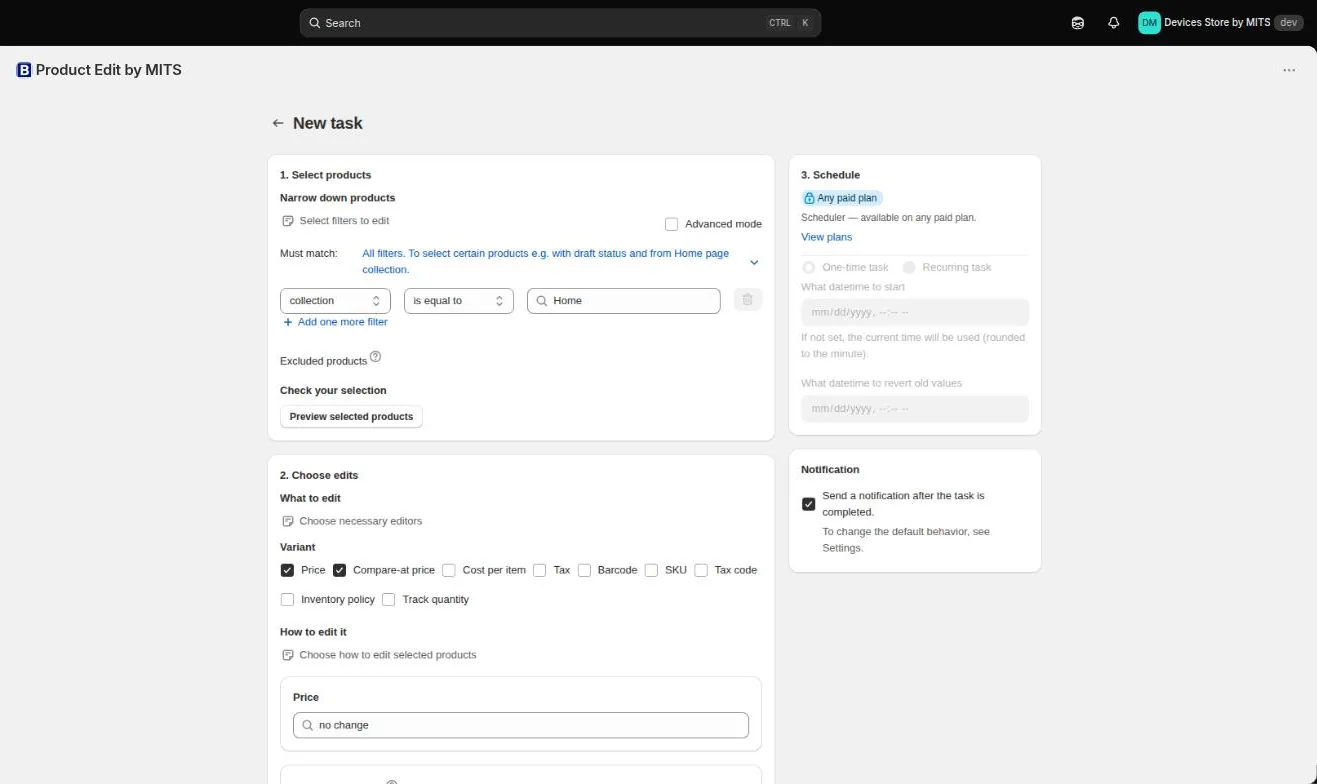
Filters live in the first panel of the New task screen. Each row is a condition — a field, an operator and a value — and the rows combine according to the “Must match” setting.
Step by step
- Choose the level. Decide whether you are selecting products or variants. Product filters edit every variant of a matched product; variant filters target individual variants.
- Add a condition. Pick the field — collection, tag, vendor, product type, title, handle, price, SKU, barcode, status, inventory, option value or a date — then the operator and the value.
- Set “Must match”. Choose whether all conditions must be true or any of them.
- Add more conditions. Use “Add one more filter” to narrow the selection, for example by adding inventory quantity more than 0.
- Exclude products by hand. Anything that matches but should not be edited can be removed in the excluded products list.
- Preview. Open “Preview selected products” and read both the count and a sample of the products themselves.
Follow the steps in your own store — the free plan covers ten products per task.
You will be redirected to the Shopify app store.
Operators worth knowing
is empty finds gaps — products with no SEO title, no cost, no barcode. It is the fastest route to a catalog hygiene task.
does not contain is how you protect a range: add a “no-discount” tag to products that should never be marked down, then exclude that tag from every promotion filter.
Automated collections shift
A smart collection re-evaluates continuously, so the products it holds when a scheduled task runs may not be the ones you previewed. For scheduled promotions, tag the products first and filter on the tag.
Related tutorials
How to bulk edit prices
Filter, editor, calculation example, result — a first price change end to end.
Read moreBulk edit products by collection on Shopify
Use collection membership as the filter, combined with stock, tags and price.
Read moreBulk edit tags on Shopify
Add, remove and rename product tags across a filtered part of the catalog.
Read more