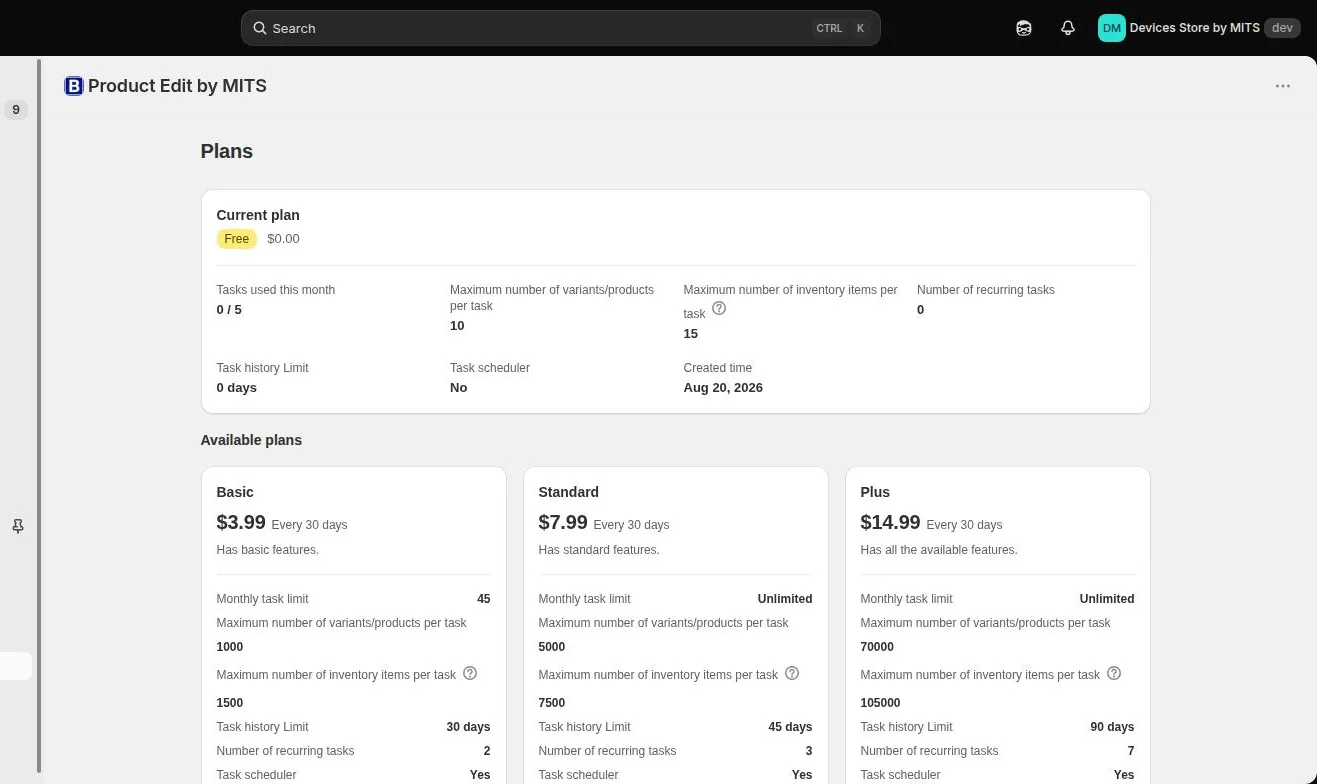
Plans differ on five numbers, and only one of them is the price. The Plans screen inside the app shows your current usage against those limits, which is a better guide than guessing from the catalog size.
Step by step
- Open Plans. The app menu has a Plans entry showing the current plan and its limits.
- Read your usage. Tasks used this month tells you whether the monthly limit is the constraint.
- Count a typical task. Work out how many products or variants one real job touches — that number, not the catalog size, decides the plan.
- Count inventory items separately. Inventory has its own per-task limit: 15, 1,500, 7,500 or 105,000.
- Decide about automation. The scheduler and recurring tasks start on Basic; the number of recurring schedules rises with the plan.
- Check history retention. 30 days on Basic, 45 on Standard, 90 on Plus — this is how far back you can revert and audit.
Follow the steps in your own store — the free plan covers ten products per task.
You will be redirected to the Shopify app store.
Variants are what count
A collection of 800 products with three variants each is 2,400 items for a variant-level edit and 800 for a product-level one. The same collection can need different plans depending on the field.
Free is a rehearsal
Ten items per task and no scheduler make the free plan a way to learn the workflow rather than a way to run a store — but it is a real rehearsal, using the same filters and editors as the paid plans.
Related tutorials
Pricing
Free plan, then $3.99, $7.99 and $14.99 per month. Plans differ by products per task, tasks per month, recurring schedules and how long task history is kept.
Read moreThe best free Shopify bulk edit option
What the free tiers really allow, and how to test an editor before paying.
Read moreFrequently asked questions
Answers about bulk editing Shopify products with Bulk Product Edit by MITS: filters, scheduling, rollback, inventory, limits, pricing and Shopify Flow.
Read more